
How I Use AI Visuals to Make Ecommerce Delivery Updates Easier to Understand
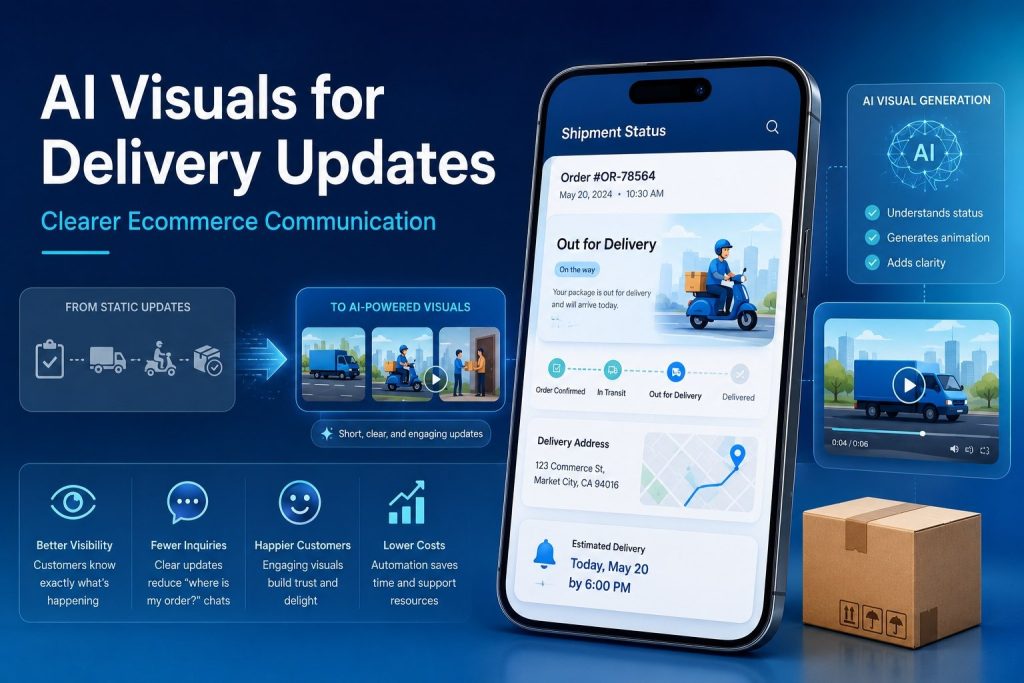
Tracking Pages Tell Customers Where a Package Is, But Not Always What It Means
I have looked at enough ecommerce tracking pages to notice one small problem: the information is there, but the customer still feels unsure.
A tracking page may say “in transit,” “label created,” “customs clearance,” or “out for delivery.” To a logistics team, those words are normal. To a customer waiting for an order, they can feel vague. Is the package moving? Is it delayed? Should they contact support? Should they wait?
That gap is where visual communication can help. I have found that simple motion visuals often explain a delivery stage faster than a paragraph of text. With image to video AI, an ecommerce team can turn product photos, order graphics, or delivery illustrations into short clips that make the next step easier to understand.
GoEnhance also provides an effective AI video generator for brands that want useful video assets without building a full production workflow. For delivery communication, that is enough. Customers do not need a movie-style video. They need a clear answer.
Why Delivery Communication Feels So Sensitive
The delivery stage is different from other parts of ecommerce.
Before checkout, the customer is still deciding. After checkout, they have already paid. Now they are waiting. That waiting period creates a strange kind of pressure. Even when the courier is moving normally, a customer may feel nervous if the tracking status does not change for a day or two.
I have seen this happen often with international orders, custom products, pre-orders, and items that pass through several courier hubs. The tracking information may be technically correct, but it does not feel reassuring.
That is why I do not think brands should treat tracking pages as purely functional pages. They are also trust pages. A clean explanation, a short visual, or a simple animated guide can make the experience feel more controlled.
Where AI Visuals Actually Help
AI visuals are not needed everywhere. A basic “your order has shipped” email can stay simple. But there are several moments where visuals can reduce confusion.
| Customer Moment | What a Short AI Visual Can Explain |
| Order confirmed | The order has been received and is being prepared |
| Package processing | The item is being packed or checked before shipment |
| In transit | The package is moving between courier facilities |
| Customs or delay | The order is waiting for clearance or updated processing |
| Out for delivery | The courier is handling the final delivery step |
| Return request | The customer needs to follow a few return steps |
The point is not to make delivery updates look fancy. The point is to remove doubt. A customer who understands what is happening is less likely to open a support ticket just to ask, “Is my order okay?”
Turning Static Delivery Assets Into Clearer Messages
Most ecommerce brands already have usable visual material. They may have product photos, packaging images, courier icons, return-process graphics, or simple warehouse illustrations. The issue is that those assets often sit still on a page.
For brands that already have product images or delivery graphics, image animation can add light movement without requiring a new video shoot.
For example, a product care image can become a short after-delivery guide. A return-process graphic can become a moving step-by-step clip. A package illustration can show a simple transition from warehouse to customer. None of this needs heavy effects. In logistics communication, small movement usually works better than dramatic animation.
I Would Keep These Videos Short
If I were building these visuals for an ecommerce brand, I would keep most of them under 10 seconds.
That may sound too short, but delivery communication is not entertainment content. Customers are usually checking the page for one reason. They want to know what is going on. A short clip should support the message, not slow the customer down.
A useful delivery visual should usually do three things:
- Show the current stage.
- Make the next step obvious.
- Avoid promising anything the brand cannot control.
That last point matters. A brand should never use AI visuals to make shipping look faster or smoother than it really is. If a package is delayed, the message should be calm and honest. If the order is still processing, the visual should not suggest it is already moving.
Trust is built through accuracy, not decoration.
How AI Visuals Can Reduce Repeated Support Questions
Customer support teams often deal with the same delivery questions every day:
“Why is my tracking not updating?”
“What does in transit mean?”
“Has my order left the warehouse?”
“How do I return this package?”
“What should I do after delivery?”
A short visual answer can help here. Instead of asking the support team to explain the same thing again and again, a brand can build a small library of delivery clips. These clips can be used in help center pages, email templates, chatbot replies, tracking pages, and post-purchase messages.
This does not replace human support. It simply handles the easy confusion before it becomes a ticket.
In my opinion, this is one of the most practical uses of AI video for ecommerce. It is not about chasing a trend. It is about saving time and making common information easier to understand.
The Best Delivery Visuals Feel Calm, Not Flashy
A lot of AI video content online is designed to grab attention. That makes sense for social media. It does not always make sense for courier tracking or ecommerce delivery updates.
For shipping communication, I would avoid fast cuts, exaggerated effects, loud colors, or anything that makes the process look too dramatic. A customer checking a delayed package does not want to feel entertained. They want to feel informed.
Good delivery visuals should feel:
- Clear
- Calm
- Mobile-friendly
- On-brand
- Honest about the process
A soft package movement, a simple route-style animation, or a clean product setup clip is usually enough. If the customer understands the update faster, the visual has done its job.
Where These Visuals Can Be Placed
AI delivery visuals can work in more places than people usually think.
They can appear in order confirmation emails, shipping update pages, delay notices, product setup guides, return instructions, FAQ pages, and customer service replies. For brands with a strong social presence, they can also be reused as post-purchase education content.
For example, a skincare brand might use a short clip to explain how to store a product after delivery. A furniture brand might show a simple unpacking or assembly reminder. A gadget store might show what should be inside the package before the customer opens it.
This is where visual communication becomes more than decoration. It becomes part of the customer experience.
What I Would Avoid
I would be careful with three things.
The first is over-promising. Delivery times depend on couriers, warehouses, weather, customs, and local handling. A visual should never imply guaranteed speed unless the brand can truly guarantee it.
The second is making every update into a video. Not every message needs motion. Some updates are better as plain text.
The third is using visuals that do not match the brand’s actual service quality. If the delivery experience is messy, a polished AI video will not fix the problem. It may even make the gap feel worse. Visuals should support a reliable process, not cover for a weak one.
Final Thoughts
Courier tracking answers the basic question: where is my package?
AI visuals can answer the customer’s quieter question: what is happening, and should I be worried?
That is why I see real value in using short, clear AI-generated visuals for ecommerce delivery communication. They can make tracking updates easier to understand, reduce repeated support questions, and help customers feel more confident after they place an order.
The best results are not flashy. They are practical. A simple visual that explains the next step can do more for customer trust than a long paragraph hidden inside a tracking page.